Deliverect Integration
Subscribe and Configure in Back Office
To get started with this integration, an OLO add-on license is required. Please ensure that the OLO web order license is purchased and Enabled under the Account's License Settings.
Navigation: Log into Back Office. On the left-side pane,
select Home then Integration Hub.
- On the Integration Hub page, select Browse and Subscribe Integrations.
- Under the Online Ordering section for Deliverect select Add.
- After selecting the Terms and Conditions box at the bottom-left, click Confirm at the upper-right.
- On the Current Integrations page: navigate to the row with Deliverect, then under the right-side Actions column select the Settings (gear) icon.
- The Settings pop-up shows two 2 tabs: Settings and Action.
- Under the Settings tab:
- Enter the Deliverect Account Id (provided by Deliverect), which is unique for each Account.
- Enter the Deliverect Location Id (provided by Deliverect to the stores.
- Under Action tab: You can set the order platform price level for menu price level, and modifiers percentage. Click Save to save your changes. Then, click Publish Menu to reflect these changes in Deliverect. If you do not set the order platform price level directly, simply click Publish Menu to publish the store’s menu items to Deliverect.
- If you click the Cancel button, the page redirects to the Current Integrations page.
Things
to Consider Before Publishing Menu Items to Deliverect:
- After creating new menu items or making any changes to existing ones, you should publish them by clicking the green Publish button at the top-right of the screen
- The Web Order service toggle must be enabled under POS settings to receive orders in the POS system
To Hide any Menu Item(s) in Online Ordering:
- Select the Store in BO.
- Navigate
to: Products/Items > Products/Items.
- Under the Menu Items tab: select the Menu
Item’s corresponding three dots (•••) button under Actions
then select Edit.
- On
the Update Menu Item page:
- Under
the Visibility section (it can be selected on the right-side pane)
- Ensure
the Hide Menu Item in Online Order toggle is enabled (set to YES).
- Then
press Update at the top-right.
- After Update is selected, navigate to the
store’s Deliverect integration and select Publish. The item selected to
be hidden in Online Ordering will not be visible in Deliverect.
- Any changes to the menu items should be first
published to POS and in online order before synchronizing to Deliverect.
Order Received
Through Deliverect
When
an online order is received through an Online Ordering Platform, this order
will be sent to Deliverect which will push this order to our LINGA POS.
Once it’s accepted on POS, the acknowledgment will be sent.
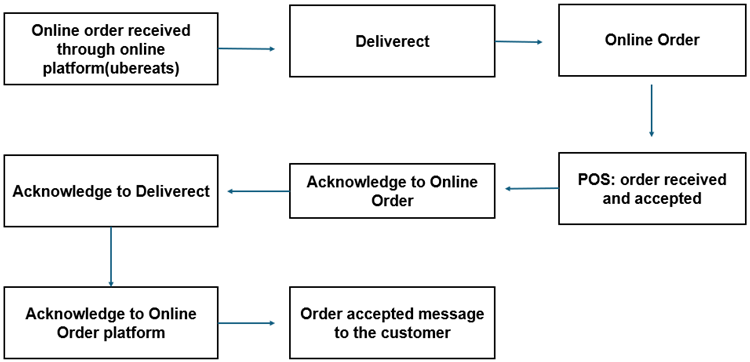
- Once an online order takes place through the Third-party (Deliverect Partners), Deliverect will transmit this Order to our LINGA POS system.
- Through LINGA, the Order can be confirmed by the Store within 30 seconds.
- When the Order is received through Deliverect, it will be directly sent to the Kitchen for preparation and the same order will be on the Active Order page in POS simultaneously.
- If an Estimated Time is configured in Back Office or Online Order Admin will be sent to the online ordering platform via Deliverect.
Notes:
- Future orders are held within the Deliverect system, until the calculated time (60 mins) required for order preparation before the promised time, and it will be directly sent to the Kitchen for preparation. The same order will be in Active Order page in POS simultaneously.
Sort Menu Config
- When you want to align/sort/order the Categories in the Ordering Platform:
- In Back Office (BO) settings, select the Sort Menu Config option (with a Store selected in BO, select Products/Items > Sort Menu Config)
- Arrange the Categories as needed by clicking-and-dragging.
- When the Categories are arranged, click Publish The arranged categories will be published in Online order by clicking on Publish Your Menu Changes in POS option, after this click on the Publish Menu Items in the Deliverect Integration in Store Settings to get displayed in ordering platform. By default, the Categories will be listed in Alphabetical order.
- Discounts will not apply to Deliverect.
Modifiers
- Modifier groups must be unique for both mandatory and optional (Example: Modifier group A cannot be available in both mandatory and optional). It can be either in mandatory or optional), using separate modifier groups for mandatory and optional modifiers.
- If we use one modifier group as a mandatory modifier, then that modifier group can’t be used as an optional modifier group in Deliverect but we can use this as a mandatory modifier with other Menu Items.
- Included Modifiers will not apply in Deliverect. It is based on the store to decide whether an included modifier needs to be added as part of the order. If you want to add any included modifier, then include that modifier as $0.
- The modifier will take the default price you first set. If you change the same modifier’s price for other menus, it won’t apply.
- Minimum and Maximum quantity will be applied to a modifier group. Here, the same modifier can be chosen multiple times based on the min max configuration in modifier group.
Maximum and Minimum
- When creating a new modifier, you can define the Maximum Number of Times field. This setting determines how many times a specific modifier can be selected in an Order.
- When creating a new product or item along with a modifier group, you can configure the Maximum Number of Quantity and Minimum Number of Quantity fields. These function similarly to modifier group settings but are applied at the product level.
- Changes made at the product level affect multiple items in that category, but mandatory modifier groups will still follow the original settings set during product and item creation.
Optional Modifier Groups
- The selection of modifiers within an optional modifier group is determined by the 'Maximum Number of Times' field set during modifier creation. This value defines the upper limit of how many times a particular modifier can be selected in an order.
- For Optional modifier group, min will be 0 and max will be defined as "*", the selection for optional modifiers will be determined individually.
Mandatory Modifier Groups
- The selection of modifiers within a mandatory modifier group is determined by the Maximum Number of Times field set during modifier creation, along with the Minimum and Maximum Quantity fields configured during menu item creation. The minimum and maximum values displayed will be based on those defined for the menu item.
- You must select at least the Minimum Quantity of modifiers.
- You cannot select more than the Maximum Quantity allowed for the group.
- Individual modifiers cannot be selected more times than their defined Maximum Number of Times value.
- If the quantity of any item on the 86 List reaches zero (0), Redis will communicate to Deliverect that these items are out of stock (the PLU Code of each item will be snoozed)
- Prefixes are not allowed in Deliverect (not supported).
- Available and Restriction Time is applicable in Deliverect. The timing will be displayed based on the Store’s Opening and Closing Hours. A Menu Item can be restricted by enabling the toggle Hide Menu Item in Online Order and publishing menu again.
- Serving Size - Multiple serving sizes can be added for a single item.
- Service Type - Phone Order ToGo / Delivery (only for deliverect).
Editing an Order
- Whenever any Order (sale) takes place:
- It appears as a line item in the New tab.
- Select the Check and then click on Edit.
- You will not be able to add menu items once the order is received through Deliverect. If attempting to edit the order by adding a menu item, the system will not allow you to add the menu item and the error message ‘You will not be able modify this order since its from online aggregator ‘appears.
- You can select Payment. When the payment is made through online payment gateway then the due balance will be 0, and you can click Submit. This will close the Check and then the Check will be moved to the Closed tab.