Retail Back Office: Inventory - Transfer Request
Navigation: Sign
into the Back Office for your Retail Store, then select Inventory > Transfer.
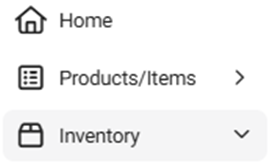
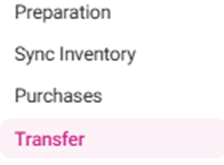
The
Transfer Requests page appears, with tabs for Transfer Requests
and Transfer Logs. Transfers are used to Send/Receive Orders from one Store to another under the same Enterprise Account.

- Please Note: Transfers will only work if both Stores have the same Menu AND Inventory Items. The Menu/Inventory backend must also be the same, which means the Menu/Inventory needs to be copied using the Menu Config tool from one Store to another in the beginning while setting up the Inventory for the Store.
Transfer Requests
Transfer Log
Transfer Requests
Contains the + New Transfer Request button and a table with the following columns:
- Source – The name of the store from which the item has been transferred.
- Destination – The store to which the inventory item has been transferred.
- Status – The request’s status, including Completed, Processed, Sent, Declined.
- Date Placed – The date [DD-MM-YYYY HH:MM AM/PM] the request was placed
- Action – Options to Approve (Checkmark) which completes the Request, or Reject (Circle with diagonal line) which deletes the Request.
New Transfer Request
- Click the + New Transfer Request button, and the New Transfer Request pane appears, with the following fields:
- Destination – This field will be greyed out as the store selected from the BO dropdown.
- Source – The source can be selected from which the inventory item can be transferred. A dropdown will be shown, the store can be selected & Only one store can be selected. Upon selecting a source, the add inventory field will be activated.
- Items To be Transferred – The table contains columns with values that correspond to the added Item: Item Type, Available Qty (Quantity), Request Qty (Quantity) and Inventory Unit.
- Select + Add Inventory Item to add a new item row to the table that represents an Item added to the Transfer Request. Select an Item from the dropdown, then enter the amount of Request Qty (including 4 decimal places). All other values are greyed out based on what was assigned for the Item and cannot be edited.
- To delete an item, select the corresponding Delete (trash can icon) at the end of its row.
- The Delete pop-up appears with the message ‘Are you sure…?’ with Cancel and Delete options. Select Delete to confirm deleting the Request or Cancel to keep it.
- Request – When all needed items have been added to the Request, select the Request button at the bottom right of the pane to submit the Request.
- Once submitted, the Transfer Request for the inventory item(s) will be completed and the Transfer Request Created Successfully confirmation pop-up appears just over the + New Transfer Request button. Once it is requested, the other Store will receive the Request under the Transfers. The Source Store has 2 options to Accept or Reject the Request. If they Accept it, the requested Item Quantity will be deducted from the Source Store and the system will add the Quantity to the Destination Store.
Transfer Log
Contains a table that displays transfer logs based on the following dropdown selections:
- Type – Select All, Inventory Item or Sub Recipe. Additional dropdowns may appear based upon the selection.
- Inventory Item – Select from the Category and Inventory dropdowns that appear.
- Sub Recipe – Select from the Sub Recipe dropdown that appears.
- Transfer Status – Select Received or Transferred.
- Time Period – Select an option from the dropdown. If Date range is selected, then select the Start Date and End Date.
- When all needed dropdown selections have been made, select Apply. The Transfer Requests table is populated with rows. If no values appear, the message Transfer Logs not found populates the table.
- Source – The store from which the inventory item was transferred
- Destination – The store to which the inventory item was transferred
- Item Name – The item which was transferred from the Source to the Destination
- Item Type – The Inventory Item or Sub Recipe type
- Unit – The unit measurement of the Inventory Item
- Received Quantity – The Quantity set in the transfer request for the respective item
- Date Processed – The date the transfer was completed [DD-MM-YYYY HH:MM AM/PM format]